
You have got Instantly dialled in. Domains warmed. Inboxes rotating. Sequences tested. Deliverability scores looking healthy. But your reply rates are flat and you cannot figure out why.
It is almost never the sending. It is the list.
If you are pulling leads from SuperSearch, you are working with self-reported company data that might be years old. Job titles from 2021. Industry classifications that say “Information Technology” when you need “B2B SaaS.” Company sizes that have not been updated since a Series A that happened three years ago. You write a great sequence, Instantly delivers it perfectly into the primary inbox, and then it lands in front of someone who left that company eighteen months ago. Bounce. Spam flag. Domain reputation takes a hit. You are punished for someone else’s bad data.
If you are paying for Apollo on top of Instantly to fix this, you are paying per seat, plus credits, for the data before you have sent a single email that books a meeting. For a solo founder or small agency running five to ten Instantly campaigns, the data bill can be higher than the sending bill.
And if you are doing it the scrappy way, manually pulling leads from LinkedIn, building CSVs by hand, guessing at email patterns, you already know that does not scale. An hour of manual research per campaign is an hour you are not spending on copy, offer testing, or closing.
The data layer is the most expensive, most frustrating, and most impactful part of your cold email stack. Fix the data and everything downstream gets better. Reply rates go up. Bounce rates go down. You stop burning domains. You stop paying for tools that do not deliver.
That is what this post is about: choosing the companies first. AgentData shows every company using your competitors’ products, and the ones that just started, with company intelligence read from each company’s own website. Your contact tool then finds the people.
What “better data” actually means for cold email
Before we get into the tool, let’s be specific about what bad data costs you and what good data looks like. This is not abstract. These are the numbers that move.
Bounce rate.Every bounced email damages your sender reputation. Instantly’s own guidance says to keep bounce rates under 3%. If your data source gives you a lot of invalid emails, you are torching domains before your campaign even has a chance to perform. Fresh, verified emails are not a nice-to-have. They are the foundation.
Targeting precision.“Software companies with 50-200 employees” is not an ICP. It is a guess. Half those companies might be B2C gaming studios. A quarter might be dev agencies. You need to know whether a company is B2B or B2C, what they actually sell, whether they are product-led or sales-led, and whether they are growing or stagnant. That is what moves reply rates.
Personalisation depth.First name and company name are table stakes. Every cold email does that now. What moves reply rates in 2026 is proving you understand the prospect’s business. Referencing that they are hiring. Noting that they have a free trial (so they are product-led). Knowing their actual industry, not a generic SIC code. You cannot personalise on data you do not have.
Cost per lead. Credit-based data tools charge you for every contact you unlock, before you even know if the email is valid. For an agency running campaigns across ten clients, that adds up.
AgentData: the company layer for your Instantly stack
AgentData is a company intelligence platform with 4,000+ technologies tracked. Every company is crawled from its live website and classified by AI.
With no account and no credits you can look up any company (50 a day) and see the first 25 companies of any customer list. Pro, at $99 a month, adds full customer lists for 10 technologies and 100,000 records to download a month, and starts with a 7-day free trial with no card.
Here is what you get for each company that you will not find in SuperSearch or Apollo’s free tier:
AI-classified industry
Not “Information Technology.” Actual categories like B2B SaaS, e-commerce, fintech, healthcare tech, professional services, agency. Classified from what the company’s website actually says they do, not a dropdown someone picked during signup in 2019.
Business model
B2B, B2C, marketplace, platform. If you sell to B2B SaaS companies, you can filter for exactly that. Not “technology companies” and then manually disqualifying half the list.
Web signals
This is where AgentData differs from a contact database. AgentData scans every website and detects:
- Pricing page (they sell something with published rates)
- Free trial (product-led growth, open to trying new tools)
- Careers page (they are hiring, which means growth and budget)
- Blog (they invest in content, marketing-aware)
- API docs (technical, developer-focused)
- CTA type (“book a demo” vs “start free trial” vs “sign up”)
These are live signals, not static fields. We re-check companies regularly, and each signal reflects the most recent crawl.
Contacts: use the tool you already have
AgentData is not a contact database. Choose the companies here, then find the people in Apollo, Hunter or Instantly’s own lead finder, and verify the addresses before you send.
People records
Named contacts, with roles where detected.
The workflow: AgentData to Instantly
Step 1: Build your ICP in AgentData
Go to agentdata.run/companies/directory and build your list using the filters that actually matter:
Start with industry.Not a broad category. A specific one. SaaS, e-commerce, fintech, healthcare, education, real estate, media, professional services, agencies. AgentData’s AI classification is based on what the company’s website says they do, so “B2B SaaS” means B2B SaaS, not “some kind of tech company.”
Add business model. If you only sell to B2B companies, filter for B2B. This one filter eliminates half the noise in a typical lead list.
Layer in web signals. This is where it gets sharp:
- Selling to growing companies? Filter for careers page detected. They are hiring. They have budget.
- Selling to product-led companies? Filter for free trial detected. They are open to trying new tools, less likely to have a gatekeeper, more likely to self-serve into your product.
- Selling to companies that publish pricing? Filter for pricing page detected. They are transparent, likely SMB or mid-market, and you can pre-qualify based on their price point.
- Selling to marketing-aware companies? Filter for blog detected. They understand content, they are more sophisticated buyers, and they are easier to reach via cold email because they live in their inbox.
Example ICP build: You run a sales enablement tool and your best customers are B2B SaaS companies in growth mode. In AgentData:
- Industry: SaaS
- Business model: B2B
- Signals: careers page (growing) + pricing page (sells a product) + blog (marketing-aware)
That gives you a list of B2B SaaS companies that are growing, selling a product at published prices, and investing in content. Every company on that list is a real prospect. Not a guess based on headcount and a two-letter industry code.
Step 2: Download the list
On Pro, download your filtered list as a CSV. Each row includes:
- Company name and domain
- Industry and business model
- Web signals detected
- The tools each company runs, with the evidence
Add the people at each company from your contact tool, and the CSV is ready for Instantly.
 Step 3: Import to Instantly and map your variables
Upload the CSV into Instantly as a new lead list. Map the standard fields (email, first name, company) and then map the AgentData fields as custom variables:
{industry}from the industry column{business_model}from the business model column{signal_careers}from the careers page flag{signal_pricing}from the pricing page flag{signal_freetrial}from the free trial flag
These become personalisation tokens in your sequences.
Step 4: Write sequences that prove you did your homework
Here is what separates campaigns that book meetings from campaigns that get archived.
Generic cold email (what most people send):
Hi {first_name}, I help companies like {company_name} improve their sales process. Would you be open to a quick chat this week?
The prospect can tell this went to 5,000 people.
Signal-based cold email (what your AgentData data enables):
Hi {first_name}, saw your team is hiring right now. When B2B SaaS companies are scaling their sales team, one of the first things that breaks is [specific problem your product solves]. We have helped companies at a similar stage [specific result]. Would it make sense to show you how?
The prospect sees that you know they are hiring, you know they are B2B SaaS, and you understand the specific problem that comes with their stage of growth. That is not a template. That is relevance.
Multi-signal email (for your highest-intent prospects):
Hi {first_name}, noticed {company_name} has a free trial and you are actively hiring. Product-led B2B companies scaling their team usually hit a point where [specific problem]. We helped [similar company] solve that and they saw [result]. Worth 15 minutes?
You are referencing their growth, their go-to-market motion, and their specific situation. Three data points that prove you are not blasting a list. Every one of those data points came from AgentData’s web signals.
For agencies: this changes your unit economics
If you run an outbound agency managing campaigns across multiple clients, the maths matters here.
A typical agency stack is a sending tool, a contact database priced per seat, and maybe Hunter or Dropcontact for verification, for every operator.
Use AgentData for the company data and you can drop a per-seat data cost from every operator.
And the data is not worse. It is different. Apollo has a larger raw contact database. But AgentData gives you web signals, AI-classified industries and business model data read from each company’s own website. You trade volume for precision, and for most campaigns, precision is what moves reply rates.
Bonus: tech stack targeting
On top of industry and company data, AgentData detects 4,000+ technologies across the websites it crawls. This is not the primary way most cold emailers build lists, but it is a powerful secondary filter for specific use cases.
If you sell a product that competes with or complements a specific tool, you can find companies that actually use that tool right now:
- Selling a Zendesk alternative? Find companies running Zendesk at agentdata.run/tech/zendesk
- Selling a Shopify app? Find Shopify stores at agentdata.run/tech/shopify
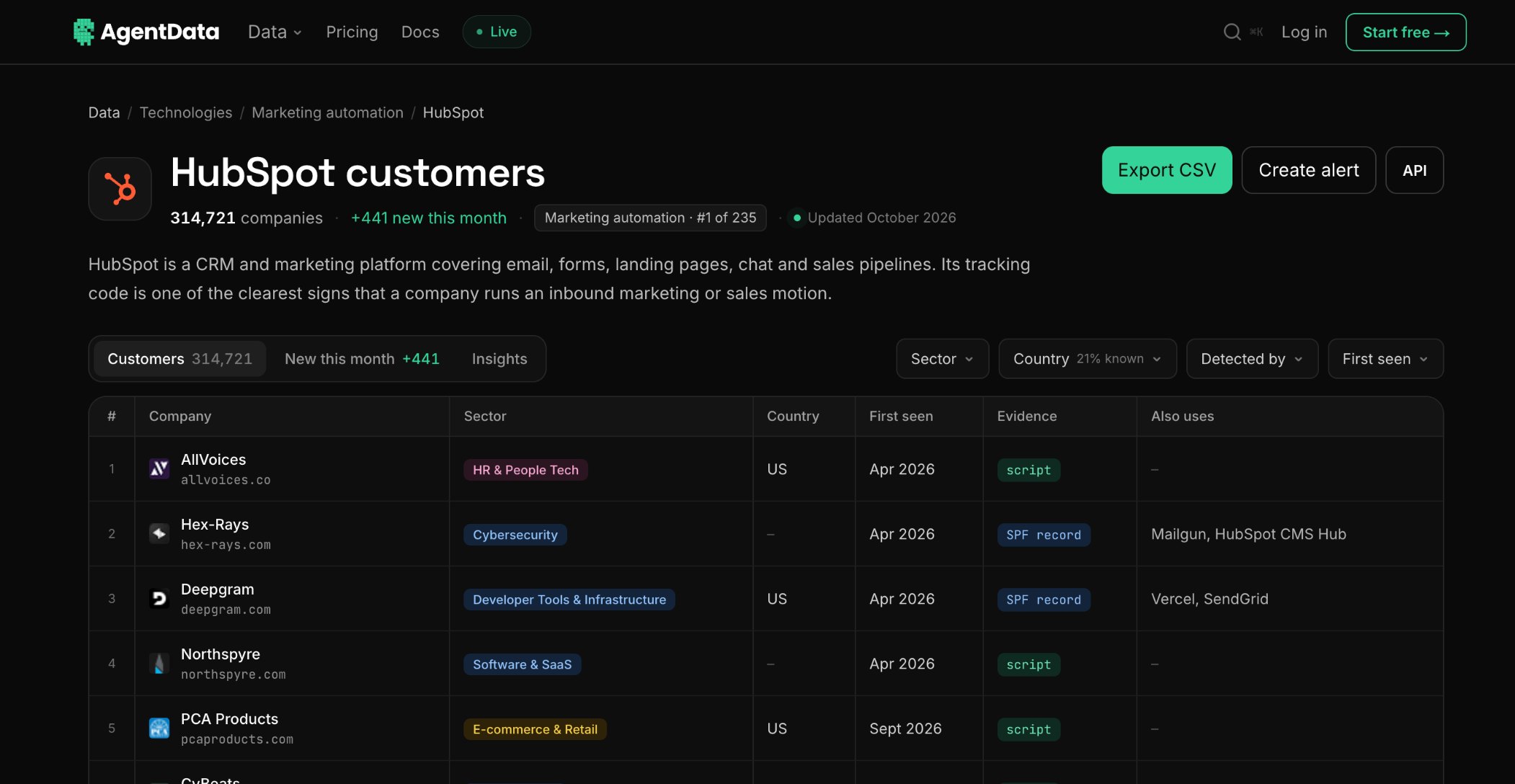
- Targeting HubSpot users? Browse agentdata.run/tech/hubspot
These detections are from live website scans, not self-reported, and each one shows the evidence and when the tool was first seen.
The AI shortcut: build lists in Claude with one sentence
If you use Claude, AgentData has an MCP server that lets you skip the UI entirely and build lead lists in plain English.
Install it:
npx agentdata-mcp-serverThen tell Claude what you want:
“Find 200 B2B SaaS companies in the UK that have a careers page and use HubSpot. Save them as a CSV for Instantly.”
Claude searches AgentData, applies your filters, and hands you a CSV. No UI. No clicking. Describe your ICP in one sentence, get a lead list back.
Apollo, ZoomInfo and Hunter have MCP servers too; our scored roundup of MCP servers for sales compares them. AgentData’s works without an account. If you are already using Claude for copywriting or research, adding AgentData to your workflow takes sixty seconds.
Full setup guide: agentdata.run/docs. For a worked example from install to a finished list, read the Claude Code prospecting guide.
AgentData vs the rest of your data stack
 AgentData
Apollo has far more contacts, and AgentData does not try to compete there. If you need 50,000 “VP of Sales at companies with 200+ employees” leads, Apollo is the tool for the people. (Hunter prices are from hunter.io/pricing on monthly billing, and Instantly’s lead database prices from instantly.ai/pricing, both as of 28 October 2026.)
But if your campaigns are not converting and you think the problem is list quality, not list size, AgentData gives you data read from each company’s own website: web signals, AI-classified industries, business model, and the evidence behind each technology. Use it to choose the companies, then find the people.
Get started
- Start a 7-day free trial at agentdata.run. No card needed.
- Browse by industry at agentdata.run/companies/directory. Pick your sector.
- Filter by signals. Careers page, pricing page, free trial, blog. Build a list that matches how your ICP actually behaves.
- Get the list out. Download the CSV on Pro, or ask Claude over the MCP server to write it. Company data, tools and web signals included; add the people from your contact tool.
- Upload to Instantly. Map the fields. Use the signals as personalisation variables. Launch.
You already built the sending machine. Now give it data worth sending.
AgentData shows every company using the software you sell against, with the proof for each and the new customers as they start. Look up any company free; Pro is $99 a month for 10 technologies.